🔁 Redirigir a los invitados después de la reserva (con datos opcionales)
¿Quieres enviar a los invitados a una página de confirmación personalizada después de que reserven contigo? Koalendar te permite redirigir a los invitados a cualquier URL, e incluso pasar los detalles de la reserva a esa página si es necesario.
✅ Cómo configurar una URL de redireccionamiento
- Abre el editor de tu página de reservas.
- Desplácese hasta la sección Después de la reserva .
-
Busca la configuración denominada «Redirigir al invitado después de la reserva (URL)».
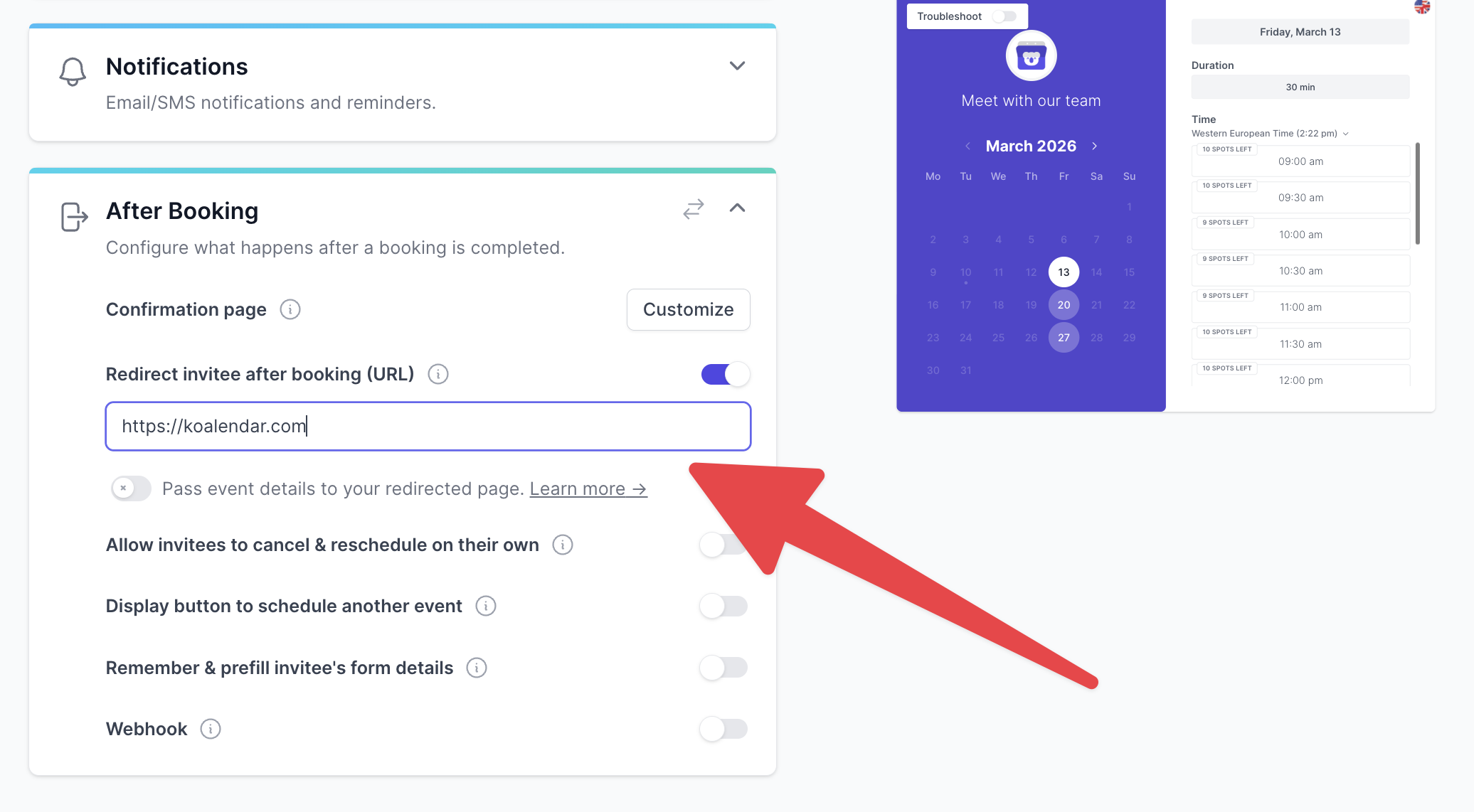
- Introduce tu URL personalizada (por ejemplo, una página de agradecimiento, un embudo de seguimiento, una página de siguiente paso, etc.).
Una vez habilitada, los invitados serán redirigidos automáticamente a esa URL después de completar su reserva.
🔗 Pasar los detalles del evento en la redirección
Después de configurar tu URL de redireccionamiento, aparecerá una opción: «Pasar los detalles del evento a tu página redirigida».

Si activas esta opción, Koalendar añadirá los siguientes parámetros de cadena de consulta a la URL de redireccionamiento:
| Propiedad | Descripción |
nombre |
El nombre completo del programador. |
correo electrónico |
La dirección de correo electrónico del programador. |
invitados |
Los correos electrónicos de los invitados, separados por una coma (por ejemplo, guest1@gmail.com, guest2@gmail.com ). |
start_at |
La fecha y hora de inicio del evento codificadas según la norma ISO 8601. |
fin_en |
La fecha y hora de finalización del evento codificadas según la norma ISO 8601. |
enlace |
La URL de la página del evento. |
número_de_reserva |
El identificador único de la reserva. |
respuesta_1 , respuesta_2 , etc. |
Las respuestas a cualquier pregunta de los invitados. |
💡 Casos de uso
- Envía a los invitados a una página de agradecimiento con tu marca.
- Realice un seguimiento de las conversiones en su herramienta de análisis.
- Personaliza los pasos de seguimiento en función de sus respuestas.
- Almacena la información de las reservas en tu propio sistema o CRM.